
Let an AI agent drive PxlMonk
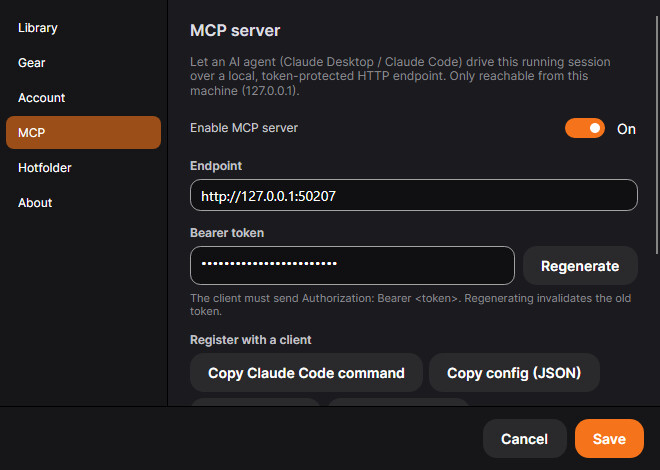
Turn on the MCP server and tools like Claude Desktop or Claude Code can drive your running PxlMonk session directly — over a local, token-protected connection that never leaves your machine.
Local-only
A token-protected HTTP endpoint on 127.0.0.1 — reachable only from this machine.
One-click setup
Copy a ready-made Claude Code command or config straight from the settings screen.
Your real session
The agent drives the actual running app — the same catalog, the same edit stack.
What it’s for
Automate repetitive editing tasks, batch operations, or let an AI agent assist with culling, tagging and adjustments — while you stay in control of what’s applied.
Local and token-protected
The MCP server binds to 127.0.0.1 only, and every request needs a bearer token you control from the settings screen — regenerate it any time to cut off access instantly.
Drop-in setup for Claude
Copy a ready-made Claude Code command or a config JSON block straight from PxlMonk’s settings — no manual wiring.
The MCP server is off by default and entirely opt-in. Enabling it does not send anything outside your machine — the connection is local-only.
Try this in PxlMonk
Join the waitlist and we’ll email you the moment PxlMonk is ready to download.
Join the waitlist